
A QR code (Quick Response code) is a unique pattern of black and white squares that can be quickly read, for example, with a smartphone. The pattern contains information, such as a link to a website. QR codes can be utilized in various situations where information needs to be shared quickly with those present, or where interactivity or feedback is desired from people on-site. QR codes are easy to open with a smartphone or tablet, as these devices have a built-in camera that recognizes the QR code. With the advancement of AI tools, creating QR codes has become even easier.
What do I need?
All members of the Tampere higher education community have access to the Copilot Chat AI service. You can find Copilot Chat in the M365 service at microsoft365.com/chat, or by opening the Copilot sidebar in the Edge browser. In both cases, make sure you are signed in. A green shield in the top right corner indicates you are logged in with your TUNI account.
What do I need to do?
- Open Copilot in the app or in your browser.
- Ask Copilot: “Create a QR code for the address [link].”
- Copilot will provide you with an image, which you can save.
- Check with your phone’s camera that the link works and that the QR code is clearly visible in the intended context.
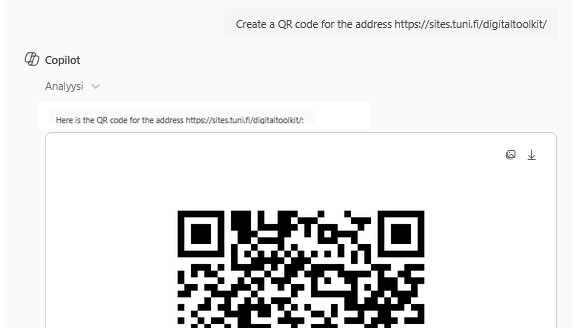
You can, for example, add a QR code to a presentation in an event or to course materials.
Note about QR codes
As QR code usage increases, so do various phishing attempts using them. When seeing a QR code, users cannot determine its content in advance or assess its reliability as easily as with a web address link. Most commonly, fraud involves a case where another QR code has been placed over a permanently fixed one, leading to a phishing site. QR codes should only be scanned when you are sure of their purpose and destination. Therefore, a QR code shared at an event or projected by a teacher in class room can be easily trusted, but users should be cautious with codes where switching code is possible.
Read more
Tip: What is Copilot?