
At Tampere Universities, students are generally permitted to use AI applications to support their learning and the completion of assignments. The use of AI is subject to rules and guidelines that concern everyone, for example regarding information security, data protection and AI applications. Guidelines for the use of AI have been published on the community’s intranet.
In addition to general rules, it is difficult to give unified guidelines for the use of AI on individual courses and in specific learning tasks, since the possibilities for AI use vary depending on the learning objectives, content, assignments and assessment methods of each course. The teacher of the course has a key role in giving instructions. Teacher can assess the benefits or drawbacks of AI use in the context of the course contents and assignments. The teacher should consider whether the use of AI will benefit or harm learning in a given task. Is the use of AI mandatory for the assignment or is it irrelevant? How should the use of AI be reported and how should its output and support for learning be evaluated? Teachers must define and inform students of the principles for AI use, either for entire courses or specific assignments. Transparency and clear ground rules for AI use are essential. This tip introduces the traffic light model created by the Rectors’ Conference of Finnish Universities of Applied Sciences Arene ry, which helps teachers guide and articulate AI use.
Four colors to guide AI use
Below are the four colors of the traffic light model, from which the teacher can choose the appropriate guideline for each task and situation. Each icon briefly tells the student how AI should be used for the given assignment. In the instructions, Here, works refer to the final output or competence produced by the student that corresponds to the objectives of the given learning assignment. This may be an essay, a research report, a presentation, a project or other concrete work that demonstrates the student’s understanding and application of the topic under consideration.
Blue – Required, must be used, must be reported

Artificial intelligence must be used to create outputs. The student must report how he/she has used AI. Failure to use AI will affect the assessment.
This is a good option when students are encouraged to use artificial intelligence and the teacher wants to ensure that students get to familiarise themselves with AI tools during their studies.
Examples:
- In this learning assignment, students critically assess the text or other media they produce with artificial intelligence.
- In this learning assignment, students develop the scenarios produced for them
by artificial intelligence, for example on the future of their industry. - In this learning assignment, students create a bot that supports learning or
prompts the AI application to serve as a tutor. - In this learning assignment, students use artificial intelligence as an active
assistant and aim to make their work more efficient with artificial
intelligence.
Red – Prohibited, not to be used

The output must be created without the help of artificial intelligence. The student should use only their own knowledge, understanding and skills. The use of AI is forbidden for a justified reason and will be interpreted as fraud.
This option is good if there are grounds for not allowing the use of AI and the teacher wants to ensure that students learn skills and knowledge withoutthe ease of using AI.
Examples:
- In this learning assignment, students demonstrate competence in mastering grammar. Students must write their own essay answers so that their language proficiency can be assessed.
- In this learning assignment, students must reflect on their competence in relation to the assignment. The purpose of the assignment is to assess the student’s ability to reflect on their own knowledge and skills. Artificial intelligence cannot take on the role of the student.
- Solving this learning task with artificial intelligence is easy. To assess students’ competence, they must respond to the assignment with their own information.
- This learning assignment is based on copyrighted material. The material used may not be fed to artificial intelligence.
Yellow – Allowed, can be used, must be reported
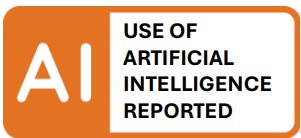
Artificial intelligence can be used in the creation of outputs, but the student must clearly report its use. Failure to disclose the use of AI will be interpreted as fraud. The use of AI may affect the assessment.
This option is good if students may use AI but the teacher also wants to ensure that the students understand the limitations of using AI and learn to explain how they have used it.
Examples:
- During the thesis process, students may use artificial intelligence for purposes such as creating a structure for their thesis and checking their text. However, students must disclose this.
- In this learning assignment, students write an article on the topic of learning. Students can use artificial intelligence to support the introduction and summary.
- In this learning assignment, students create a PowerPoint presentation on the topic of learning. Students use artificial intelligence to visualise their presentation.
- In this learning assignment, students prepare a presentation on a
multidisciplinary topic. They may use AI for help in the assignment, but the ways in which AI has been used must be disclosed to enable assessing which share of the assignment is based on the student’s knowledge and which is not.
Green – Allowed, can be used, need not be reported
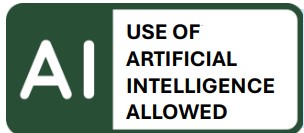
Artificial intelligence can be used freely and without report to create the output. The use of AI does not affect the assessment.
This is a good option when students are allowed to use AI freely without restrictions. The use of AI will not affect the grade, which means that it does not add significant value to the student’s performance.
Examples:
- In this learning assignment, the use of artificial intelligence does not make students’ work easier. Students may use artificial intelligence if they find it necessary.
- In this learning assignment, students answer the question based on video material in a closed environment. The material is only available with viewing permissions and cannot be downloaded.
- In this learning assignment, students demonstrate their competence in
practical situations. Students may use artificial intelligence if they find it
helpful. - In this learning assignment, students familiarise themselves with material in a foreign language. Students use artificial intelligence to translate the materials.
Using the traffic light model
If the traffic light model’s icons are used in a course, it is advisable to inform students about the model at the start of the course, for example in the study instructions or at the opening lecture. In addition, each assignment should include instructions according to the selected marker. The icon gives a quick guideline for AI use, but the general instruction should be tailored to fit each assignment and clarified as needed for each learning task.
If the course includes a Moodle area, you can add traffic light model icons to assignments and instructions within the Moodle course page. A button has been added to Moodle’s text editor that allows you to insert a suitable icon into a text field, for example at the end of an assignment description or instruction text. The icon includes a link to more detailed guidance on the traffic light model.
You can add AI traffic lights anywhere in Moodle where the content can be edited with TinyMCE text editor (default text editor in Moodle). Typically, it’s best to add the AI traffic light at the end of the assignment description on its own line.
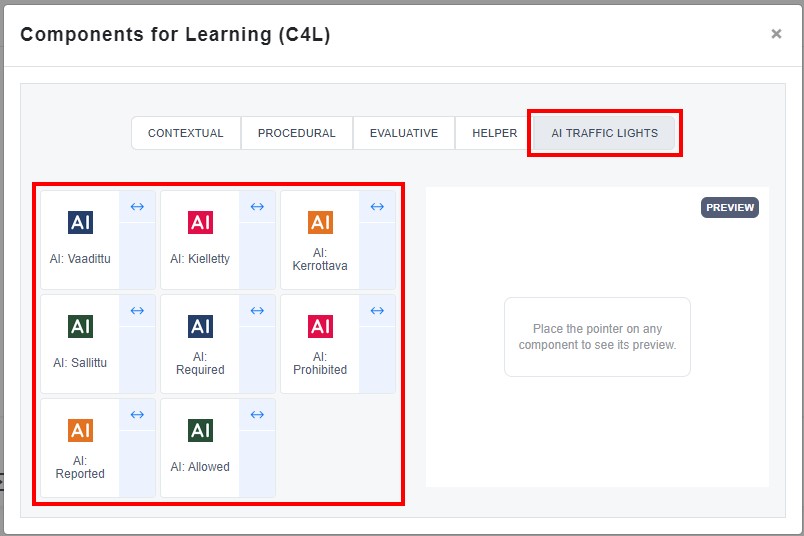
In the text editor, click on the “Lego brick” icon, i.e. the C4L button.

Select AI traffic lights -tab and choose the AI traffic light to insert. There are eight options: four traffic lights in Finnish and four in English.
The general instructions for the traffic light model can be linked to the course area from Arene’s website: Traffic light model