
A rubric is a tool used for evaluating student performance. It makes the assessment process transparent and comparable. The rubric typically includes assessment criteria (i.e., which aspects are being evaluated) and assessment levels (for example, on a scale from 1 to 5 or described verbally). The rubric also supports learning by helping students understand what they should focus on when completing assignments. It can also facilitate self- and peer-assessment, as students use the rubric to evaluate their own or each other’s work.
However, it is important to remember that artificial intelligence cannot replace teacher in assessment. The Tampere Higher Education Community’s guidelines for the use of artificial intelligence in teaching state: “Teachers may only use secure, approved AI tools to support student assessment. Student submissions may not be uploaded to any external AI applications. The teacher must always personally conduct the final overall assessment.” Nevertheless, AI can serve as an effective assistant in planning and developing assessments. This tip describes how AI can help a teacher create a rubric.
What do I need?
All members of the Tampere Higher Education Community have access to the Copilot Chat. You can find Copilot Chat in the M365 service at microsoft365.com/chat or by opening the Copilot sidebar in the Edge browser. In both cases, ensure that you are logged in. A green shield in the upper right corner indicates that you are signed in with your TUNI credentials.
What do I need to do?
Utilizing AI begins with crafting a good prompt. Describe the assignment, learning objectives, and the desired structure for the assessment criteria. Additionally, AI can assist in formatting the rubric into a clear and illustrative table, making it easy to use during evaluation.
For example, for an essay assignment, a prompt might be: “Create a rubric for the university’s introductory course essay assignment on topic X, evaluating the student’s critical thinking, use of sources, and clarity of argumentation. Use a 1–5 scale and describe what is required at each level. Base the rubric on the course topic and the following learning objectives required for the course:…” After receiving the initial suggestion, you can refine the prompt and request corrections or changes as needed.
A rubric can also be designed for group work. In this case, AI would be instructed to consider, for example, collaboration skills or the equitable participation of group members. The rubric can also support self-assessment, where students compare their own work to the learning objectives outlined in the rubric.
Once the rubric is created, it can serve as a foundation for generating automatic feedback for students. AI can create feedback templates corresponding to the elements in the rubric. However, remember that the final assessment of a student’s work cannot be performed by AI; the teacher must always review and be responsible for the evaluation.
A real-world example of a prompt for creating a rubric is provided by University Lecturer Josefina Sipinen:
Prompt for creating a rubric for a political science quantitative methods course:
“Help me create a rubric for the quantitative methods course in political science. Students are tasked with completing an assignment using survey data (population survey), and the assignment specifies dependent, independent, and control variables. In the assignment, students must describe the research variables (measurement level and possible variable transformations), select and justify the appropriate analytical methods, and report the analysis results. Guidelines have been provided for reporting results using APA style. In SPSS exercises, students have practiced creating figures (e.g., histogram, bar chart, mean + confidence interval chart). Apply these instructions when creating the rubric and define what constitutes an appropriate description for grades 1, 3, and 5.” A copy of the assessment criteria description from the intranet is then attached.
As a result, AI divided the assessment into dimensions of knowledge and action according to the example provided. Copilot was then prompted to create a rubric that, instead of knowledge and action, evaluates four aspects: 1) description of variables, 2) choice of methods, 3) analysis and reporting, and 4) use of figures and tables.
Creating a Rubric Using the Teams Class Assignment Tool
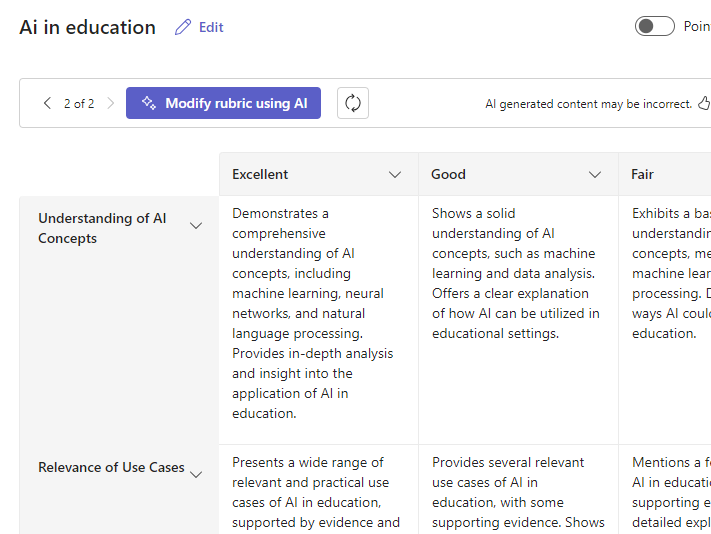
In addition to Copilot chat, a rubric can be created in the Teams Class area, where you will find the Assignment tool.
This tip describes how to create a rubric in an Assignment in Teams: Teams Class: Using AI to create assignments
Rubric Agent
If you have a recurring assignment, you can utilize Copilot Chat agents so you do not have to provide similar instructions to AI each time. Read instructions for creating agents in this tip.
For creating rubrics, you can set up an agent that remembers, such as the desired structure of the rubric, the scale it is based on, etc. This setting will be retained in the agent’s memory, allowing you to vary the subject for different courses.
Read More
See the Tampere Higher Education Community’s guidelines for AI in teaching.